You’ve booked the venue and picked a date. Now you want the people you love to keep that day free, before their calendars fill with other weddings, holidays and work trips. That’s the whole job of a save the date: one clear message, sent early enough to matter.
More couples now send theirs by text or email instead of by post. It’s quick, it reaches relatives who move house more often than they update their address, and it leaves the printing budget for the invitation itself. Here’s how to do it well, from what to say to how to send it, with screenshots of one way to make it on your phone.
When to send your save the dates
Most etiquette guides suggest sending save the dates six to eight months before the wedding, and closer to a year ahead for a destination wedding or a date on a holiday weekend. Guests who need to book flights, ask for time off or arrange childcare will thank you for the head start.
A digital save the date also lets you send in waves. Send to immediate family and the wedding party first, then everyone else once your guest list is settled. Just don’t send one to anyone you aren’t sure you’ll invite: a save the date is a promise that an invitation follows.
What to include (and what to leave out)
Keep it short. A save the date has four jobs:
- Your names, written the way your guests know you.
- The date, in full: the day of the week, the date and the year.
- The place, at least the town or city, so people know whether they need to travel.
- “Invitation to follow”, so nobody mistakes it for the invitation itself.
Leave the ceremony time, the dress code and the menu for the invitation. If you have a wedding website, you can add its address, but don’t pack it with registry links. The save the date is about the date.
Step 1: Add the day and the place
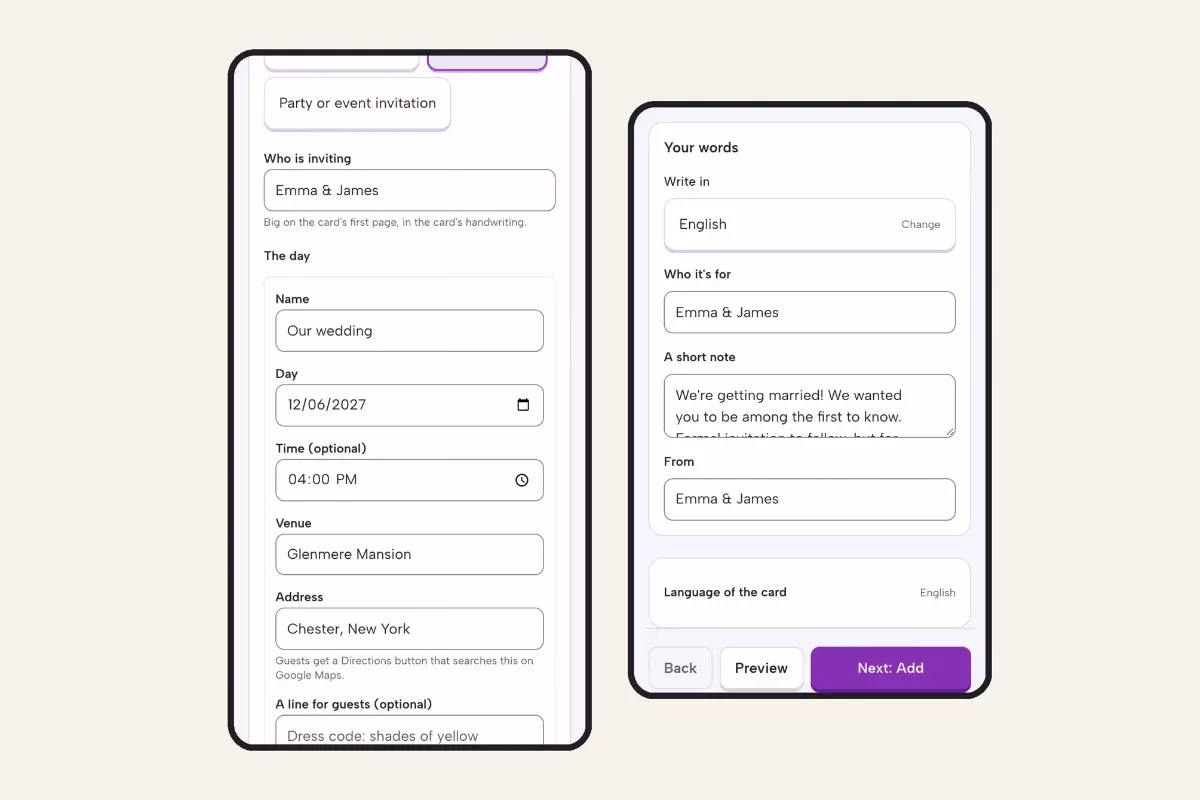
Whichever tool you use, start with the facts. In the example below, made with a digital save the date maker on a phone, you choose “Save the date”, type your names as they should appear, then fill in the day, the venue and the town. The time is optional at this stage, so you can leave it out if the ceremony time isn’t set yet.
Type the address the way a guest would search for it on a map: guests get a Directions button, so a venue name plus the town works better than a vague “upstate”.
Then write a short note in your own words. One or two sentences is plenty: “We’re getting married, and we wanted you to be among the first to know.”
Step 1: the date and venue go in first (left), then a short note in your own words (right).
Step 2: Make the reveal part of the fun
A save the date sent as a plain text gets read and forgotten. One that asks the guest to do something gets remembered, and shared with whoever is sitting next to them.
In this example the date sits under a panel of gold foil. Your guest scratches it away with a finger (or taps “Reveal the date” if they’d rather not), and the date appears with a countdown to the day. It’s a small moment, but it’s the same reason people love a scratch-off engagement announcement: the news arrives as a little surprise rather than a line of text.
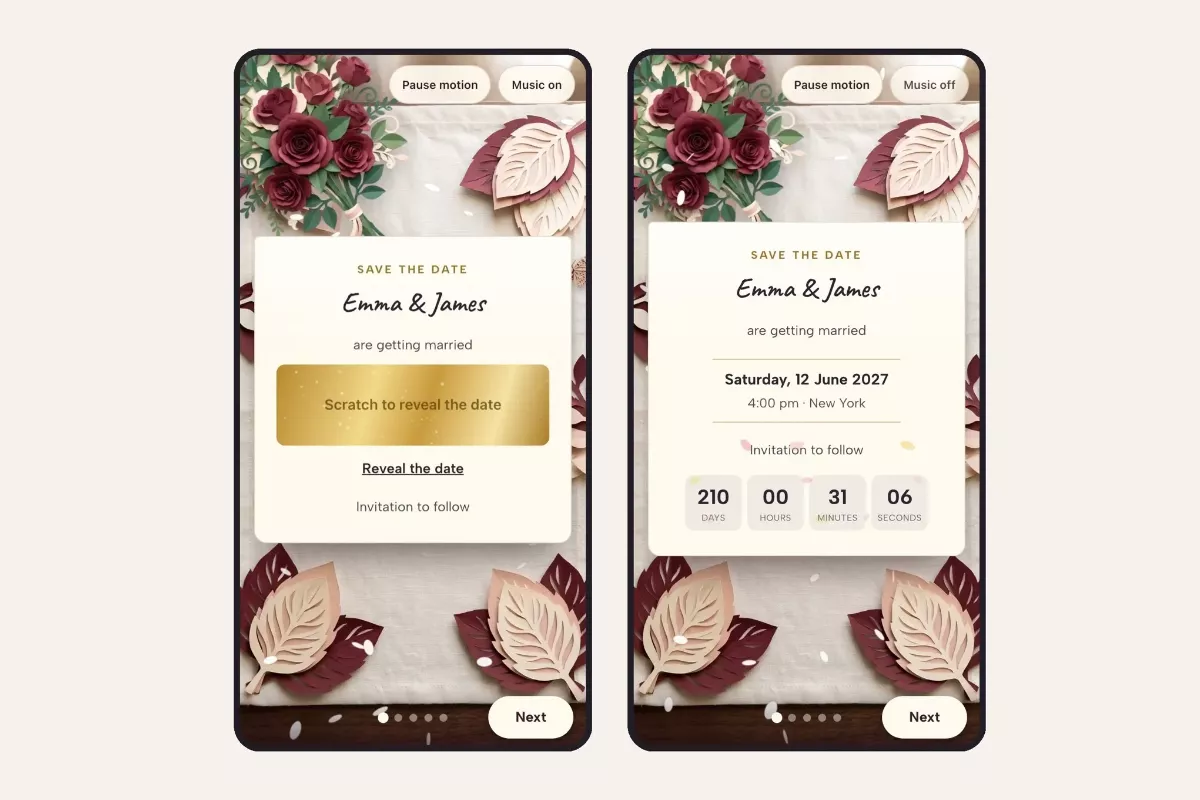
What guests see: the date hides under foil (left) until they scratch it away (right).
Whatever style you choose, check it on a phone before you send it. Most guests will open it on one, and many will open it in the middle of something else. Big text and one clear thing to do beat a busy design every time.
Step 3: Help guests put it in their calendar
The best save the date is the one that ends up in your guest’s calendar, because that’s where they’ll see it when another plan comes up for the same weekend.
Look for an “Add to calendar” button that works with Apple Calendar, Google Calendar and Outlook. In the example, guests tap it on the “When and where” page, and the Directions button opens the venue on Google Maps.
Step 4: Ask “can you make it?” early
A save the date isn’t a formal RSVP, but a quick “Will you join us?” gives you an early head count while you’re still choosing a caterer and a venue layout. Guests answer yes, not sure yet, or no, and can add a note for you.
Each answer arrives in your inbox, and you can see every reply in one list. It’s not binding, and you’ll still collect formal RSVPs with the invitation, but it tells you early whether that cousin abroad is likely to fly in.
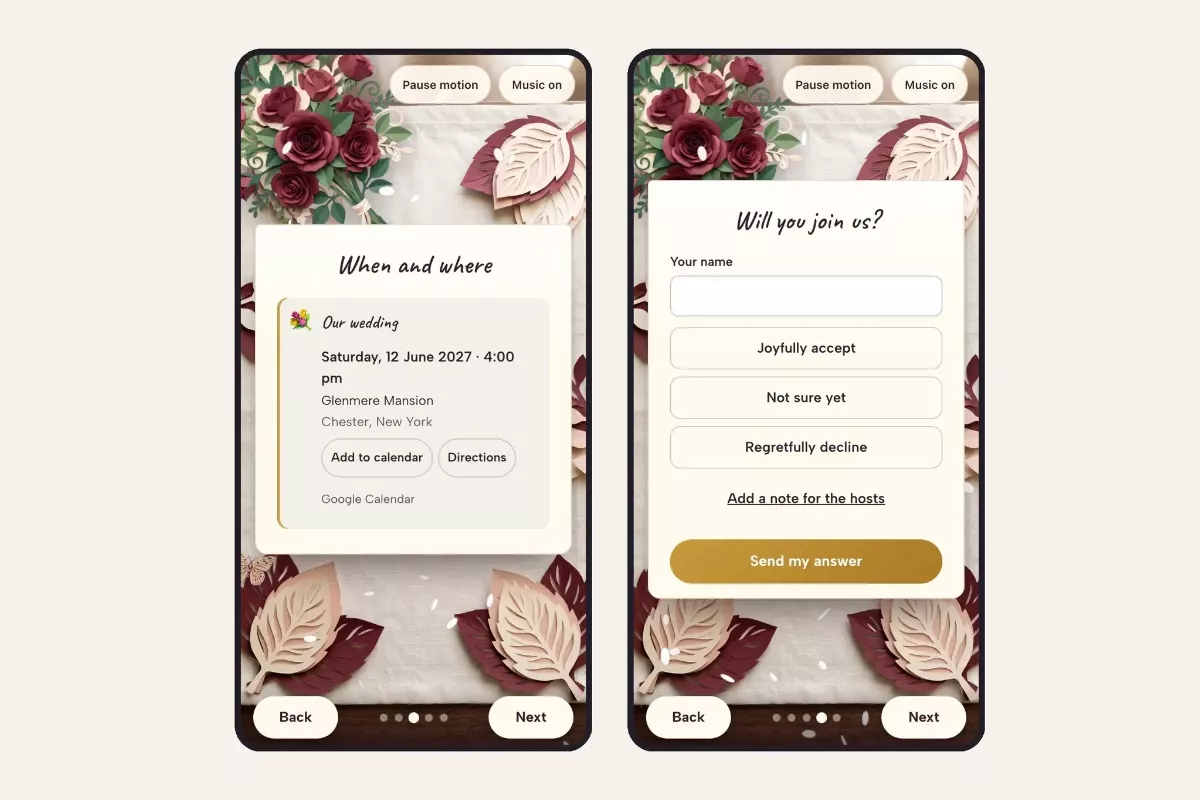
The date goes straight into guests’ calendars (left), and they can tell you early whether they can come (right).
Step 5: Send it the way your guests talk
The beauty of a digital save the date is that it’s a link. Send it in your family WhatsApp group, by text to your college friends, and by email to the colleagues you don’t text. Guests don’t need an app or an account: it opens in their phone’s browser.
A few tips before you hit send:
- Send yourself a test first. Open it on your own phone, scratch the foil and tap every button.
- Personalize the message around the link. “We’d love you there, Aunt Linda!” gets a warmer reply than a bare link.
- Keep a list of who you’ve sent it to, so nobody hears about your wedding second-hand.
- Print a few for the grandparents. Some relatives will always prefer something they can put on the fridge. A digital save the date doesn’t have to be the only one.
Common questions
Is a digital save the date tacky?
Not anymore. Guests are used to receiving invitations by text and email, and a save the date that’s well designed, personal and sent early reads as thoughtful, not cheap.
Can I send the formal invitation later with the same link?
In most tools the invitation is a separate card, with the full schedule, each event’s venue and the formal RSVP. Your save the date stays as it was, and the invitation follows as its own link.
What if our plans change?
That’s one advantage of a link over paper: if the venue changes, you can update the details instead of reprinting and reposting.
How do we keep it private?
Share the link directly with guests rather than posting it publicly on social media, and ask close family not to forward it on.
This is a partner post.